

Order lifecycle: statuses, payment and confirmation
A complete explanation of the order and payment statuses in Lueira, how they relate to each other, and when an order is confirmed automatically or manually depending on the payment method.
On this page
- Order lifecycle: statuses, payment and confirmation
- Summary
- Order statuses
- Payment statuses
- Payment summary at order level
- When is an order confirmed automatically?
- The usual case: payment links
- Summary table by payment method
- Frequently asked questions
- Cancelling an order: what it does and what it does not
- Overpaid orders and payments that do not add up
- The order shows "Overpaid"
- The order is confirmed but the payment shows as pending
- The bank says the charge has been made, but in Lueira the payment is still pending
Order lifecycle: statuses, payment and confirmation
Summary
In Lueira, every order has two lifecycles running in parallel: the order status (whether it is confirmed or not) and the payment status (whether the money has come in or not). They are independent: an order can be 100% paid and still not be confirmed. This guide explains how each one works, how they relate and what to expect depending on the payment method.
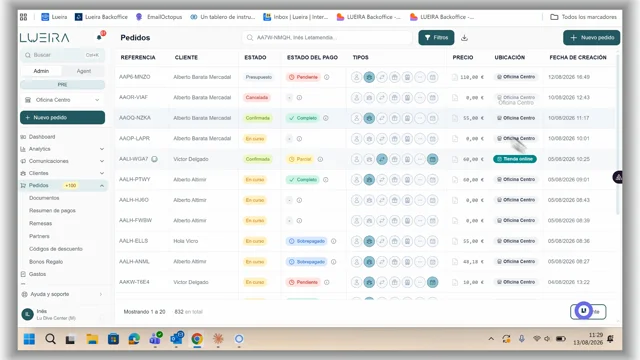
Order statuses
An order can be in one of these four statuses:
In progress: the order has been created but is not closed yet. Availability or stock is reserved.
Quote: it is a proposal sent to the customer. It does not reserve stock or confirm anything until it is accepted.
Confirmed: the order is closed. Confirmation emails have been sent (or will be sent) to the customer and to the tenant and, if applicable, the check-in forms.
Cancelled: the order has been voided.
Payment statuses
Each individual payment added to an order has its own status:
Pending: the payment is created but the customer has not paid yet.
Processing: the payment has been started in the gateway (Redsys, LueiraPay/Stripe) and we are waiting for the response.
Completed: the gateway has confirmed the charge, or the user has manually marked it as paid (cash, Bizum, bank transfer).
Failed: the gateway has rejected the payment.
Cancelled: the payment was cancelled before being completed.
Refund pending / Refunded: statuses associated with refunds.
Payment summary at order level
In addition to the status of each individual payment, every order has a summary that shows how much has been collected compared with the order total:
No payments / Not applicable: the order has no registered payments or its total is 0.
Pending: payments have been created but none has been completed yet.
Partial: part of the total has been collected.
Completed: 100% of the order has been collected.
Overpaid: the total collected exceeds the order total.
When is an order confirmed automatically?
An order changes to Confirmed automatically only in this scenario:
The order was created through the checkout of the customer's online store and the online payment (Redsys or LueiraPay/Stripe) was completed successfully.
In any other case (an order created from the backoffice (in admin), a booking by phone, by email, in person or a payment link sent manually), the order is not confirmed on its own. You have to mark it as Confirmed manually from the order details.
The usual case: payment links
When you create an order from the backoffice (in admin) and choose the "Create payment and send by email" option with Redsys or LueiraPay/Stripe, a link is sent to the customer so they can pay. When the customer pays:
The payment status changes to Completed automatically. The gateway notifies us by webhook.
The order payment summary changes to Completed if that payment covers the total.
The order status remains In progress or Quote. It is not confirmed automatically.
Summary table by payment method
Order origin | Payment method | Payment status | Order status |
Online store | Redsys / LueiraPay | Automatic → Completed | Automatic → Confirmed |
Backoffice + payment link | Redsys / LueiraPay | Automatic → Completed | Manual → Confirmed |
Backoffice | Bank transfer | Manual → Completed | Manual → Confirmed |
Backoffice | Cash / Bizum | Manual → Completed | Manual → Confirmed |
Frequently asked questions
I sent a payment link and the customer has paid. Why is the order not confirmed?
Because orders created outside the Online Store are not confirmed automatically, even if the payment has come in. You have to confirm it yourself from the order details.
Cancelling an order: what it does and what it does not
To cancel an order, use the Status button at the top of the order and choose Cancelled. Keep in mind:
It does not refund the money. If the customer had already paid, make the refund from the Payments block (Refund button for gateway payments, or a negative payment for manual payments). Step by step in Refunding the money of an order that has already been paid.
It does not void the invoice or the receipt. If you had already issued them, they still exist: correct them from the Invoicing block (Correcting an invoice or a receipt).
It can only go back to "In progress". On a cancelled order, the Status menu only offers In progress. From there, if needed, you can confirm it again.
It is not the same as deleting it. A cancelled order stays in the list with the Cancelled tag; a deleted one disappears. More detail in Deleted and cancelled orders.
Overpaid orders and payments that do not add up
The order shows "Overpaid"
It means that the sum of the completed payments exceeds the order total. The most common cause is that the same payment has been recorded twice, for example:
The customer paid a Redsys or Lueira Pay link and, in addition, someone manually recorded a card, cash or transfer payment for the same amount.
A manual payment was recorded for the total when the customer had already paid part of it through the gateway.
How to fix it:
Check the Payments block and compare it with what you have actually collected (in your cash register, card terminal, bank or Redsys panel).
If there is an extra manual payment recorded by mistake, correct it with Edit or delete it with that payment's trash can.
If the customer has really paid twice, refund the excess amount (Refunding the money of an order that has already been paid).
💡 Payment links that are still Pending (sent but not paid) do not count towards the amount paid, so they do not cause an overpayment.
The order is confirmed but the payment shows as pending
This is possible: the order status and the payment status are independent. An order can be Confirmed and have no completed payment (for example, if you confirmed it by hand or if the customer chose bank transfer in the online store). When you collect the money, record the payment or wait for the customer to pay the link.
The bank says the charge has been made, but in Lueira the payment is still pending
Look up the transaction in your bank's Redsys panel and check that it appears as authorised.
Do not record a manual payment "to make it add up" or send another link to the customer until it is clarified, so as not to duplicate the charge.
Write to support with the order reference and the date and amount of the transaction so that we can look into it.
🔒 Do not include passwords, SMS codes or your POS terminal's signing key in the chat: the order reference is enough for us.
Videos about this guide
Related guides
- Orders navigationView the status of all your orders, invoices or payments
- How to create ordersWe show you how to create orders and add every type of product to them.
- Creating a lesson booking from the admin: several days, a second teacher and line priceHow to create a lesson order from the admin: add private or group sessions, book several days in a row, add a second teacher without losing the charge for the second lesson and change the price of a line.
- Order statusesThis section gives you an overview of the status an order is in
- Deleted and cancelled orders: the difference, how to see them and how to ask for them to be restoredThe difference between cancelling and deleting an order, where to find cancelled orders, how to find out who changed or deleted an order with Change tracking, and what to do so support can restore an order deleted by mistake.
- Cart link: send an order to be paid from the online storeHow to generate and send the cart link: an alternative to the payment link, designed for quotes that can be completed in the online store.