

Order statuses
This section gives you an overview of the status an order is in
If we go to the Orders section in the side menu, we will see that the third column of the Dashboard shows the order status. This section gives us an overview of the status an order is in.
An order has four statuses;
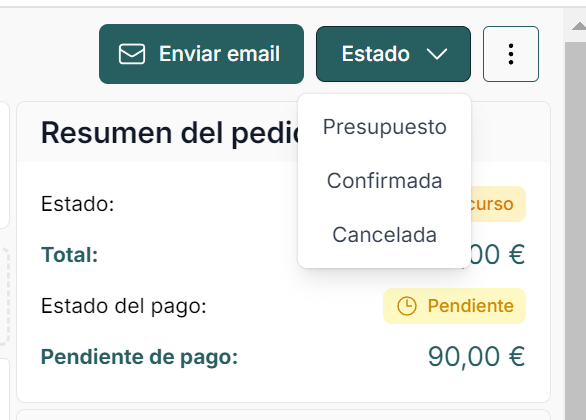
In progress: The customer has placed the order but the payment has not been made yet, so the order remains in progress.
Quote; When we send a quote to the customer and it is pending acceptance by the customer.
Confirmed: Once the customer confirms the order, it will change to confirmed. When the customer places an order through the online store, the order status changes automatically to confirmed. However, if the customer places the order by phone, by email or in person, we will have to change the order status to confirmed manually.
Cancelled; The order will change to cancelled when the customer does not accept the quote or does not make the payment.
If you have any questions, don't hesitate to contact the Lueira support team!
Related guides
- Orders navigationView the status of all your orders, invoices or payments
- How to create ordersWe show you how to create orders and add every type of product to them.
- Creating a lesson booking from the admin: several days, a second teacher and line priceHow to create a lesson order from the admin: add private or group sessions, book several days in a row, add a second teacher without losing the charge for the second lesson and change the price of a line.
- Order lifecycle: statuses, payment and confirmationA complete explanation of the order and payment statuses in Lueira, how they relate to each other, and when an order is confirmed automatically or manually depending on the payment method.
- Deleted and cancelled orders: the difference, how to see them and how to ask for them to be restoredThe difference between cancelling and deleting an order, where to find cancelled orders, how to find out who changed or deleted an order with Change tracking, and what to do so support can restore an order deleted by mistake.
- Cart link: send an order to be paid from the online storeHow to generate and send the cart link: an alternative to the payment link, designed for quotes that can be completed in the online store.