

Settings (School / Center / Activities)
Configure the parameters of your school, center or activities space: levels, meeting points, schedules, prices and more.
To access the Settings section, go to School / Center / Activities > Settings.
The menu name and the team terminology vary depending on the type of business configured in Lueira:
Ski school / Sports school: the module is called "School" and the team are the teachers.
Diving center: the module is called "Center" and the team are the instructors.
Active tourism: the module is called "Activities" and the team are the guides.
From Settings you can configure the following aspects:
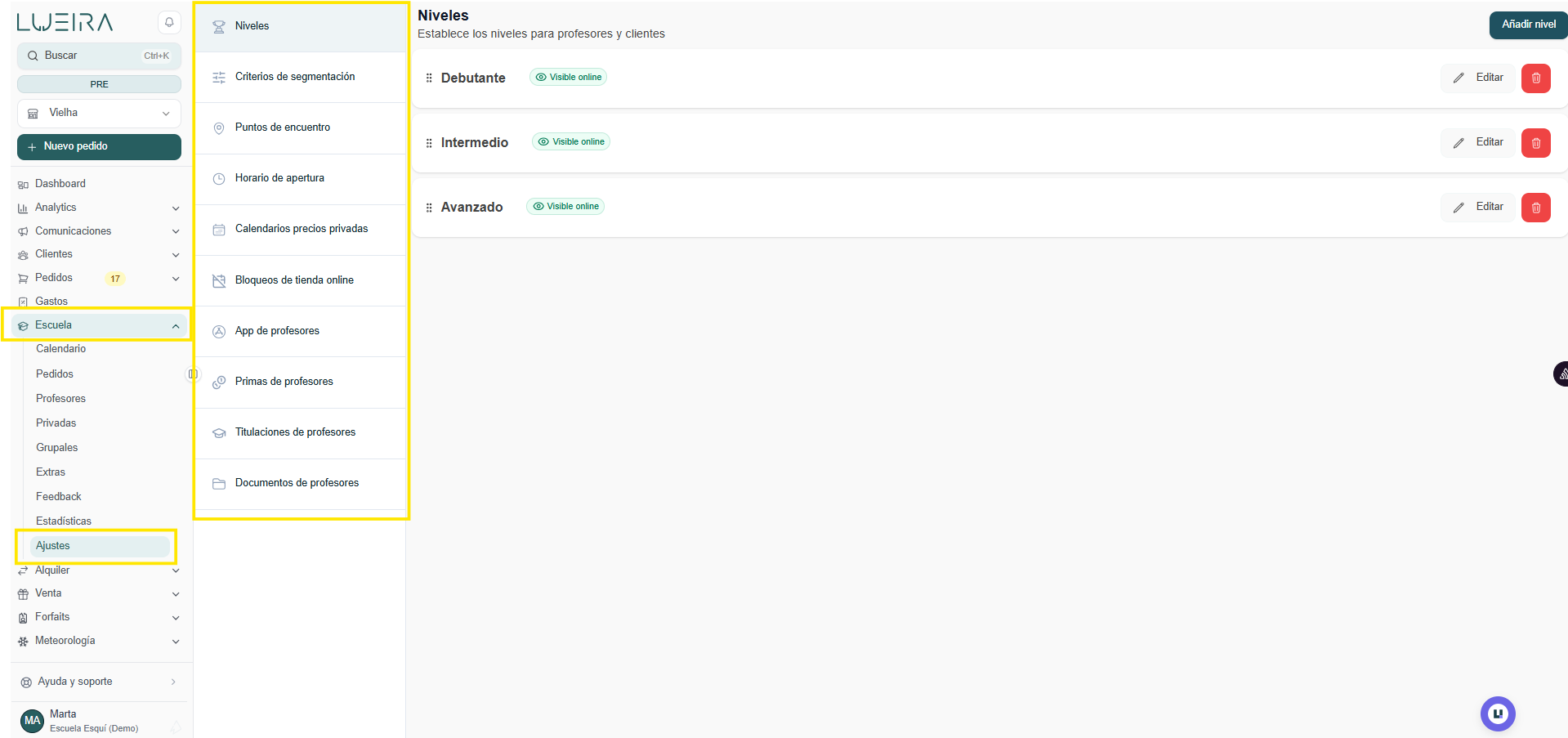
Levels: Configure the different skill or knowledge levels you want to apply to your activities and customers. You can add as many levels as you need and name them as you see fit, for example: beginner, intermediate, advanced. If you do not need to differentiate levels for a specific activity or product, we recommend creating a "Not applicable" level.
Meeting points: Define the places where the team meets customers to carry out the activities. This information is key for customers, the team and managers alike. When you create a new booking or set up a new product, the system will ask you to specify the meeting point. From the "Times" tab you can also set the minimum travel time between meeting points, to avoid consecutive bookings that are not feasible for the team. Learn more about meeting points in private products and about travel times between meeting points.
Segmentation criteria: Define characteristics of your customers or participants (for example, level, age or weight) that are used to automatically distribute them into groups within a Short course, instead of creating the groups by hand. See the Segmentation criteria guide.
Opening hours: Define the start and end times of your activities; that is, the time range in which customers can book private products and in which you can set up the sessions of group products.
Tide-based generation (only for water sports schools that depend on the tide: surfing, kitesurfing, etc.): Define the time window around high tide and low tide and the reference point at sea, to automatically generate group product sessions and team availability according to the tide, without having to check the tide table and create them by hand one by one. See the Tide-based generation guide.
Private pricing calendars: Manage the pricing calendars you will apply to your private products. See the Private product pricing guide to learn how to create and manage pricing calendars.
Teachers / instructors / guides app: The team can download the Lueira Instructors mobile app to view their schedule of assigned activities. From here you configure how many hours ahead each team member can see (Viewing hours) and which customer and order details are shown to them in the app (first name, last name, phone number, comments and form answers in group lessons). The app also lets them record working hours. You can download the app from Settings > Teachers / instructors / guides app. See the guide to configuring the Teachers / instructors / guides app.
Teacher / instructor / guide bonuses: Configure the different salary bonuses you may pay the team. For example: Requested lessons +€5/h, Lessons in English +€10/h. When creating a new order you can select the corresponding bonus. See the guide on salary bonuses.
Teacher / instructor / guide qualifications: Add the qualifications and certifications you want to record for your team. You will use this information when setting up each team member's profile, where you can assign the qualifications they hold. See the Team management in Lueira guide.
Teacher / instructor / guide documents: Define which documents each team member must provide (contract, national ID (DNI), official qualifications, etc.). Once configured, you can track the documents delivered by each person from their profile page. See the guide on Required documents for the team.
Dive sites (only for Diving Centers): Configure the different diving points or areas where the activities take place. This information will be available when planning group diving sessions.
Product blocks in the online store: Temporarily hide group lesson products, packs and private lessons from the online store on specific dates and times (for example, to reserve a time slot for a private group), without affecting the bookings the team creates manually from the admin panel. It is unrelated to Opening hours and does not affect rental products. See the guide on Blocking products in the online store.
If you have any questions, do not hesitate to contact the Lueira support team!
Related guides
- Configuring Company Settings in LueiraIn this section you can configure all the properties of your school
- Features: turn optional features on or off in your accountHow to turn Short courses, Private lesson vouchers, Material resources and Instructor ranking on or off from Settings > Company > Features.
- Several sites or centers in one Lueira accountHow to manage several sites (establishments) in the same account: create a site, give it its own online store link and decide whether it invoices with its own tax details.
- Diagnose: check your setup, an order or a productHow to use the Diagnose button and the Setup status screen to find out what is missing or wrong in your account, your store, an order, a pack or a product, and how to fix it.
- Create and manage locationsHow to create, edit and delete a location (a physical place where you operate) in Settings > Locations, what each field means and what to do if you cannot create one.
- Payment methods and gateways in LueiraComplete guide to all the payment methods and gateways available in Lueira: LueiraPay (Stripe), Redsys, Bizum, PayPal and manual methods (cash, card, bank transfer, remittance, other).