

Send a broadcast by WhatsApp or email to the participants of a session
From the calendar or a session's detail page you can message all participants at once with an approved WhatsApp template or by email.
Where a broadcast is sent from
A broadcast is a message you send to several people at once. In Lueira you launch it from the Send button found in:
The class calendar (Activities > Calendar), for the participants of the period you are viewing.
The detail of a session of a group product, for the participants of that session.
The Send button is enabled when there are participants to write to; if there are no bookings in that period, it appears disabled. When you click it, you choose the channel: Email or WhatsApp.
Broadcast by WhatsApp
WhatsApp only lets you start a conversation with a template approved by Meta. That is why, before sending, you need a template in Communications > Templates > WhatsApp with the status Approved (see WhatsApp templates in Lueira).
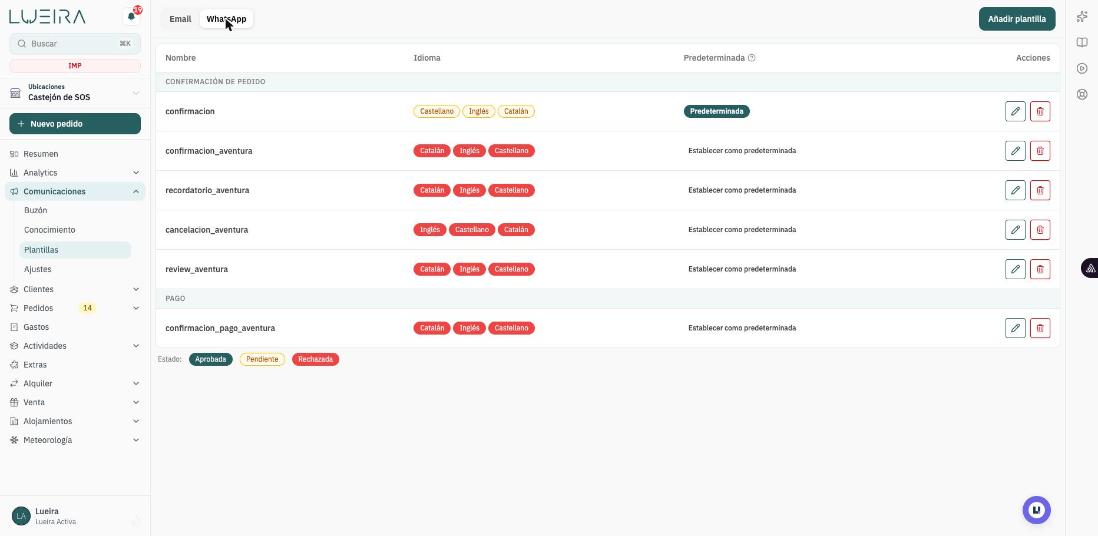
Click Send > WhatsApp.
Review the recipients (you can add phone numbers by hand, with the country code, for example
+34600000000).In Select a template choose one of the approved ones.
Click Send. You will see "Broadcast started": it is sent in the background and we notify you when it finishes.
Keep in mind:
Recipients without a country code are skipped (the notice tells you how many).
If the template uses the customer's name, phone numbers added by hand (with no registered customer) will receive that field empty.
If the template uses variables that cannot be resolved in a broadcast, the template is marked as unusable and you will not be able to select it.
If you don't see any template, you will see "No approved templates available".
Broadcast by email
Click Send > Email.
Review the recipients and, if you wish, add more addresses.
Write the Subject and choose an email Template or Free message.
Click Send. The sending is done in the background.
To send marketing email campaigns to groups of customers, don't use this feature: it has its own flow in the marketing module.
Related guides
- Communications in LueiraThe Communications module brings together everything you need to talk to your customers by email and WhatsApp: templates, the WhatsApp Agent, the unified inbox and the knowledge base that feeds the WhatsApp Agent.
- Before connecting WhatsApp: prerequisites in MetaStep-by-step guide to preparing your Meta business portfolio, business verification, display name and number, and to choosing between the WhatsApp Business app (coexistence) and a dedicated number (Cloud API).
- Connect WhatsApp in LueiraHow to connect your WhatsApp Business number to Lueira: choose between connecting the WhatsApp Business app or a dedicated number, and complete the process in Meta in under 2 minutes.
- One WhatsApp number per locationIf your account has several locations, each one can have its own WhatsApp number. Requirements, how to connect them and what is shared between numbers.
- WhatsApp AgentSet up the WhatsApp Agent, which automatically replies to your customers' WhatsApp messages, uses your articles as its source of information and can create orders directly from the chat.
- What the WhatsApp Agent sells and what it does when it can'tThe WhatsApp Agent only books what exists as a product in your store. For everything else it sends the customer the purchase link from your website. Here you can see how it works and how to set it up.