

What the WhatsApp Agent sells and what it does when it can't
The WhatsApp Agent only books what exists as a product in your store. For everything else it sends the customer the purchase link from your website. Here you can see how it works and how to set it up.
On this page
What the WhatsApp Agent books and what it doesn't
The WhatsApp Agent only closes a booking when what the customer asks for exists as a product in your Lueira catalog and can be booked. In that case it checks availability and price live, builds the order and sends the payment link inside the conversation (see WhatsApp Agent).
But a customer may ask about things that you don't sell through Lueira: a trip run by another provider, a product you only book on your website, a service you haven't set up yet… In those cases the WhatsApp Agent doesn't make up a booking. Instead of leaving the customer without an answer, it sends the link to the website where they can buy.
It answers with the information from the Knowledge article about that product (approximate price, what is included, etc.).
It adds the purchase link you have configured in that article.
It uses the link for the customer's language; if there is none for that language, it uses the default link.
It copies the link as is: it doesn't shorten or modify it.
It doesn't mention Lueira: for the customer, the link is your business's.
How to set it up for a product you don't sell on WhatsApp
Go to Communications > Knowledge and create (or edit) the article for that product.
In the Content step, fill in the Web purchase URL field with the address where the customer can buy it.
If your website has a different address for each language, switch to the tab of each language and fill in its URL.
In the Products and status step, don't link any Lueira product and leave the article as Published.
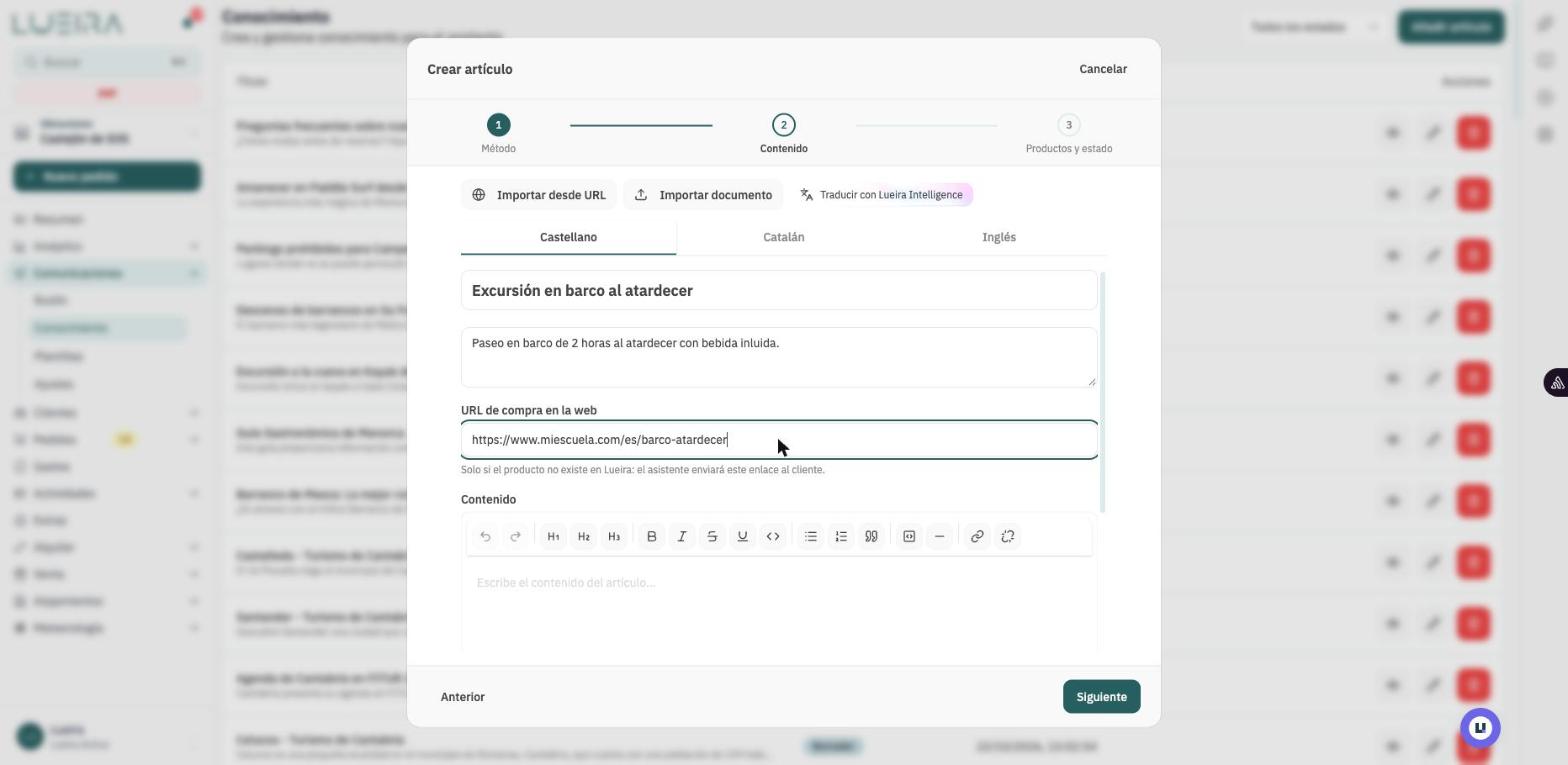
The field warns about its use: "Only if the product doesn't exist in Lueira: the assistant will send this link to the customer". You can see all the details in Web purchase link in Knowledge articles.
Frequently asked questions
The WhatsApp Agent didn't send the link
Check that the article is Published (a draft is not used).
Check that the article has the purchase URL filled in and that it starts with
http://orhttps://; if it isn't valid, the form won't let you save.The link is only sent when there is no Lueira product that matches what the customer asks for. If that product does exist in your catalog, the WhatsApp Agent will try to book it.
I want it NOT to sell anything on WhatsApp
Today there is no "inform only" switch. If you prefer to handle bookings yourself, you can pause the WhatsApp Agent or add a number to the blocklist (see The WhatsApp Agent doesn't reply or replies badly).
The customer says the price doesn't match
If the WhatsApp Agent can't confirm the customer's price, it doesn't continue with the booking or send a payment link: it tells the customer that it is passing the conversation to your team, and you receive the pending conversation notification.
Related guides
- Communications in LueiraThe Communications module brings together everything you need to talk to your customers by email and WhatsApp: templates, the WhatsApp Agent, the unified inbox and the knowledge base that feeds the WhatsApp Agent.
- Before connecting WhatsApp: prerequisites in MetaStep-by-step guide to preparing your Meta business portfolio, business verification, display name and number, and to choosing between the WhatsApp Business app (coexistence) and a dedicated number (Cloud API).
- Connect WhatsApp in LueiraHow to connect your WhatsApp Business number to Lueira: choose between connecting the WhatsApp Business app or a dedicated number, and complete the process in Meta in under 2 minutes.
- One WhatsApp number per locationIf your account has several locations, each one can have its own WhatsApp number. Requirements, how to connect them and what is shared between numbers.
- WhatsApp AgentSet up the WhatsApp Agent, which automatically replies to your customers' WhatsApp messages, uses your articles as its source of information and can create orders directly from the chat.
- WhatsApp Agent Knowledge: how to create articles it uses wellHow to create, link to products, translate and publish the Knowledge articles the WhatsApp Agent draws its answers from.