

Communications in Lueira
The Communications module brings together everything you need to talk to your customers by email and WhatsApp: templates, the WhatsApp Agent, the unified inbox and the knowledge base that feeds the WhatsApp Agent.
On this page
Communications in Lueira
The Communications module is the hub from which you manage all your conversations with customers in Lueira. From here you configure what is sent, how it is sent and who replies through the two available channels: email (transactional notifications such as order and payment confirmations) and WhatsApp (conversations, reminders and automatic notifications).
You will find it in the side menu, below the Dashboard. It has four sections:
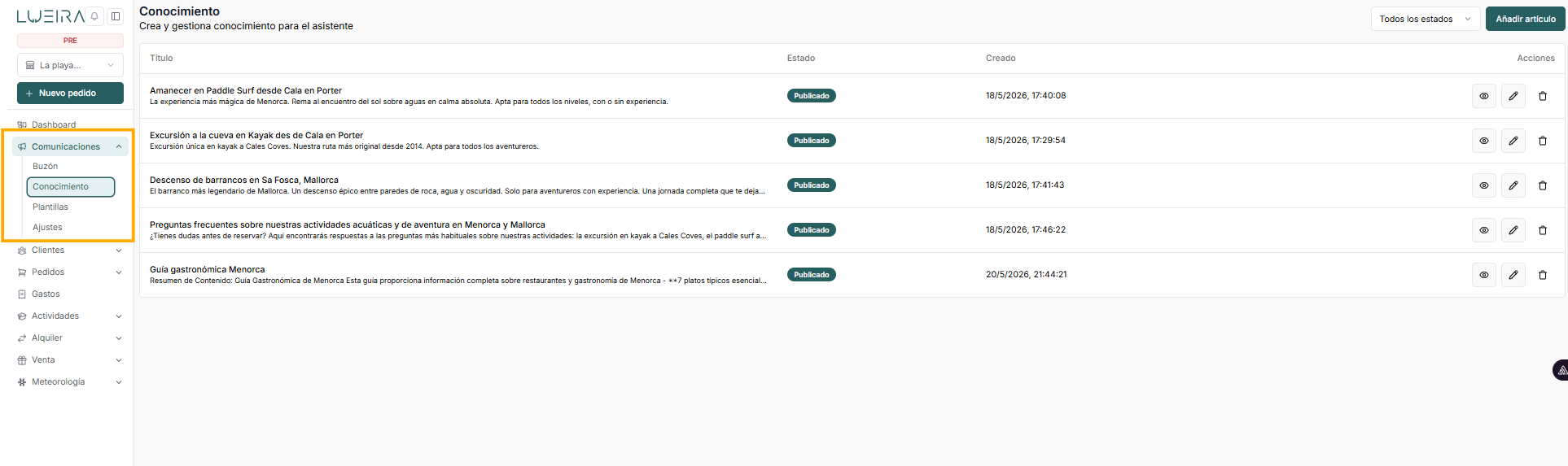
Inbox — all your WhatsApp conversations in one place. You can read them, reply manually or see what the AI has replied.
Knowledge — the base of articles the WhatsApp Agent uses as its source of information. Here you define what the AI "knows" about your business.
Templates — predefined email and WhatsApp messages that you send manually or automatically when an event happens (order confirmation, payment received, session reminder…).
Settings — connection with WhatsApp Business, WhatsApp Agent configuration, internal email copies and the number block list.
The two communication channels
Lueira lets you talk to your customers through two complementary channels. Each one has its own use case and configuration.
Transactional emails are the backbone of your communication with customers: order confirmation, payment confirmation, check-in forms and other notifications linked to the booking. They are sent in the customer's language and filled in automatically with the real data of each order if you have custom templates configured.
From the Email tab of Templates you can create, edit and preview each template, manage versions by language and use the AI assistant to write or translate the content.
👉 Read the full article on Email configuration in Lueira — it includes when emails are sent automatically and when you have to send them manually.
WhatsApp adds two complementary capabilities to your communication with customers:
1. WhatsApp templates
Outgoing messages that you send to your customers. You create them once, Meta approves them and from then on you can:
Send them manually from the detail of any order.
Schedule them to be sent automatically when an event happens: order confirmed, payment received, X hours before a session, etc.
Useful for confirmations, reminders and transactional notifications.
👉 Read the full article on WhatsApp templates
2. WhatsApp Agent
An AI that replies for you to incoming messages. You give it a name and a tone and provide information about your business in the Knowledge section — and from then on it holds conversations, answers questions and can even create orders directly from the chat.
Useful for replying outside business hours, taking workload off your team and giving your customers an immediate response 24/7.
👉 Read the full article on the WhatsApp Agent
Related articles
Is it included in my plan?
Is it included in my plan?
Transactional emails (order and payment confirmation) are part of Lueira. By contrast, WhatsApp templates and the WhatsApp Agent are extra services: they are not included by default in the plan.
To find out what you have active, check Settings → My plan and Settings → Lueira Stones (additional modules and add-ons). If you want to activate WhatsApp or the WhatsApp Agent, or you have questions about what your plan includes, write to us and we will explain it to you.
If something is not working
WhatsApp templates are not sent or show as undelivered: check the problems section of WhatsApp templates in Lueira.
The AI does not reply to a customer: check the problems section of WhatsApp Agent.
Problems connecting the number: Before connecting WhatsApp: prerequisites in Meta.
Related guides
- Before connecting WhatsApp: prerequisites in MetaStep-by-step guide to preparing your Meta business portfolio, business verification, display name and number, and to choosing between the WhatsApp Business app (coexistence) and a dedicated number (Cloud API).
- Connect WhatsApp in LueiraHow to connect your WhatsApp Business number to Lueira: choose between connecting the WhatsApp Business app or a dedicated number, and complete the process in Meta in under 2 minutes.
- One WhatsApp number per locationIf your account has several locations, each one can have its own WhatsApp number. Requirements, how to connect them and what is shared between numbers.
- WhatsApp AgentSet up the WhatsApp Agent, which automatically replies to your customers' WhatsApp messages, uses your articles as its source of information and can create orders directly from the chat.
- What the WhatsApp Agent sells and what it does when it can'tThe WhatsApp Agent only books what exists as a product in your store. For everything else it sends the customer the purchase link from your website. Here you can see how it works and how to set it up.
- WhatsApp Agent Knowledge: how to create articles it uses wellHow to create, link to products, translate and publish the Knowledge articles the WhatsApp Agent draws its answers from.