

Using a Rental product as an extra
How to link Rental products as extras of group, Rental or private products, with built-in stock and price management.
On this page
Using a Rental product as an extra
In addition to the "classic" extras (fixed price), you can link a Rental product as an extra of:
A group product (for example, different bike models as an extra of a guided downhill ride).
Another Rental product (for example, offering a helmet or a wetsuit as an extra when renting a surfboard).
A private product (for example, offering protective gear or specific equipment as an extra of a private lesson).
How it works
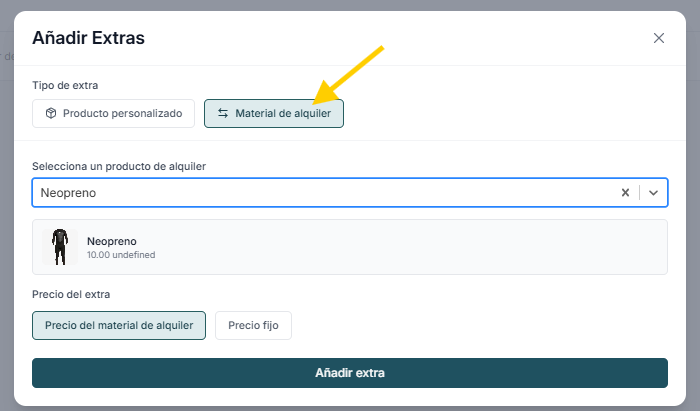
From the settings of a group, Rental or private product, in the Extras tab, you can search for and link Rental-type products.
The same Rental product can be linked as an extra in several products at once (group, Rental or private), while still working as a free rental in the Online Store.
When linking it, the "Price as extra" field is used to define the price that will apply in that context:
You can inherit the price of the Rental product.
Or set a new price specific to when the product behaves as an extra.
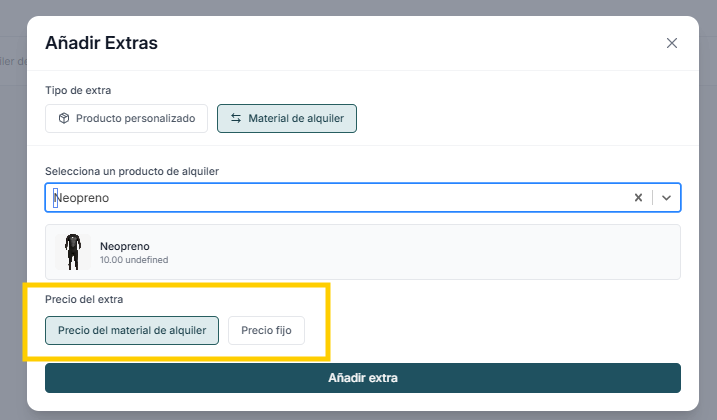
The price of the product as a free rental is not modified.
Availability and stock: the Rental product linked as an extra follows its usual stock logic. If there are no units available for the selected time slot, the customer cannot add it.
No double booking: if a unit has already been blocked as an extra, it cannot be sold as a free rental during the same time slot (and vice versa).
When you link a Rental product as an extra, all its variations are linked automatically.
What a Rental extra cannot do (services without return or with their own days)
A Rental product linked as an extra is still rental equipment. Before using it for a service (for example, boot drying or ski storage), keep these limits in mind:
A Rental product has no option to mark it as a service that does not require return.
When adding an extra to a pack already included in an order, the window only lets you choose the extra. There is no field to specify the extra's own days or dates.
There is no option for the tiered per-day price of an extra to be calculated with one day less than the rental.
Alternative: "Custom product" type extra
If the service needs no return or stock and can have a fixed price, create it as an extra of type Custom product in Extras (with Fixed price) and link it to your pack or product. It does not work if you need a price that changes depending on the number of days.
If you need tiered prices by number of days for a service without return, write to support: there is currently no option for this and we will log it as a request.
Related guides
- Online store settingsThis guide shows you how to set up your online store in Lueira, including the purchase (checkout) form fields that can be shown as visible or required.
- Purchase form fields in the online storeHow to configure which fields appear in the online store checkout form and which ones are required for the customer.
- Automatic invoicing in the online storeHow to set up the automatic generation of invoices and receipts when a payment is completed in the online store, including numbering series and compatibility with Verifactu and TicketBAI.
- Product order in the Online StoreGuide to defining the order in which products are displayed in the Online Store
- Product page layouts in the Online StoreLearn how to choose between the 4 layouts available for your Online Store's product page and how to preview them before enabling them
- Online store screen layoutThe online store shows School/Center/Activities, Rental and Sales as separate tabs depending on which modules are enabled on your account.