

Online store screen layout
The online store shows School/Center/Activities, Rental and Sales as separate tabs depending on which modules are enabled on your account.
On this page
The online store shows one tab for each module you have enabled. School / Center / Activities, Rental and Sales are enabled independently of each other, so depending on which modules your account has you will see one, two or all three tabs — if a module is not enabled, its tab simply does not appear in the online store.
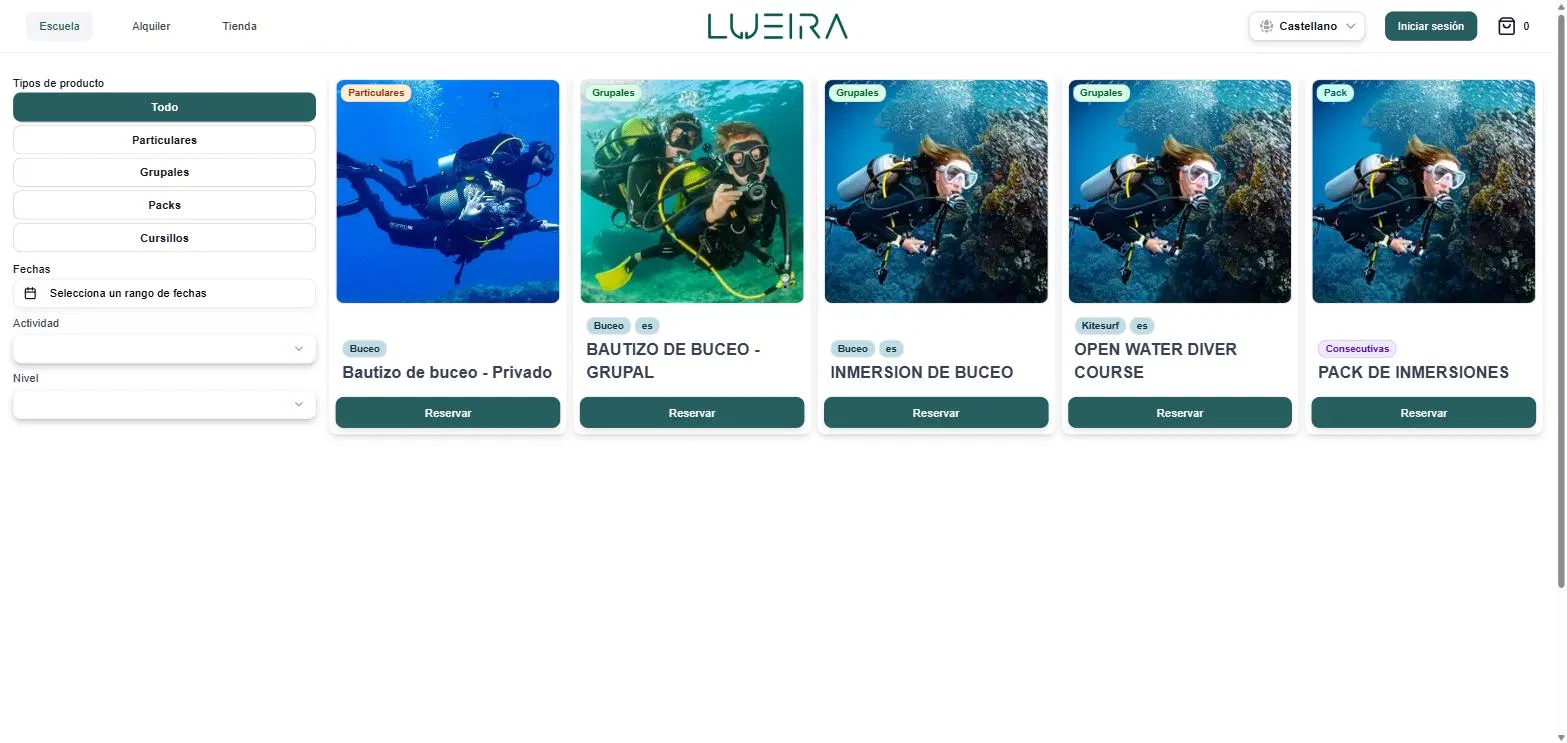
1. School / Center / Activities
This is where the customer books the products of your school, center or activities: private, group, packs and, if you have the Courses module enabled, courses. They can filter by activity type (Private, Group, Packs, Courses), by date range, by specific activity and by level. Each product shows its tags (activity, language, etc.) and a "Book" button.
2. Rental
This is where the customer rents your equipment. Rental has two sub-sections: Packs (sets of products, for example a complete kitesurf kit) and Products (individual items: boards, sails, wetsuits, etc.). They can filter by dates and, for individual products, by brand and category.
3. Sales
This is where the customer buys your physical products (merchandising, accessories, etc.) without having to book a date. See the guide Selling Sales products in the Online Store to enable and configure it.
If you have any questions, don't hesitate to contact the Lueira support team!
Related guides
- Online store settingsThis guide shows you how to set up your online store in Lueira, including the purchase (checkout) form fields that can be shown as visible or required.
- Purchase form fields in the online storeHow to configure which fields appear in the online store checkout form and which ones are required for the customer.
- Automatic invoicing in the online storeHow to set up the automatic generation of invoices and receipts when a payment is completed in the online store, including numbering series and compatibility with Verifactu and TicketBAI.
- Product order in the Online StoreGuide to defining the order in which products are displayed in the Online Store
- Product page layouts in the Online StoreLearn how to choose between the 4 layouts available for your Online Store's product page and how to preview them before enabling them
- Online store visibility: catalog, direct link or disabledHow to control whether a product appears in the catalog, is only accessible through a direct link, or is not sold online, and how to share its link from the product page.