

A partner's invoices: totals, commission and download
See a partner's issued invoices, their totals and the commission on the partner page, and download them as PDFs by period.
On each partner's page, the Invoices tab gathers all the invoices issued in its name, with the totals for the period.
Where it is
Go to Orders → Partners, open a partner and go to the Invoices tab.
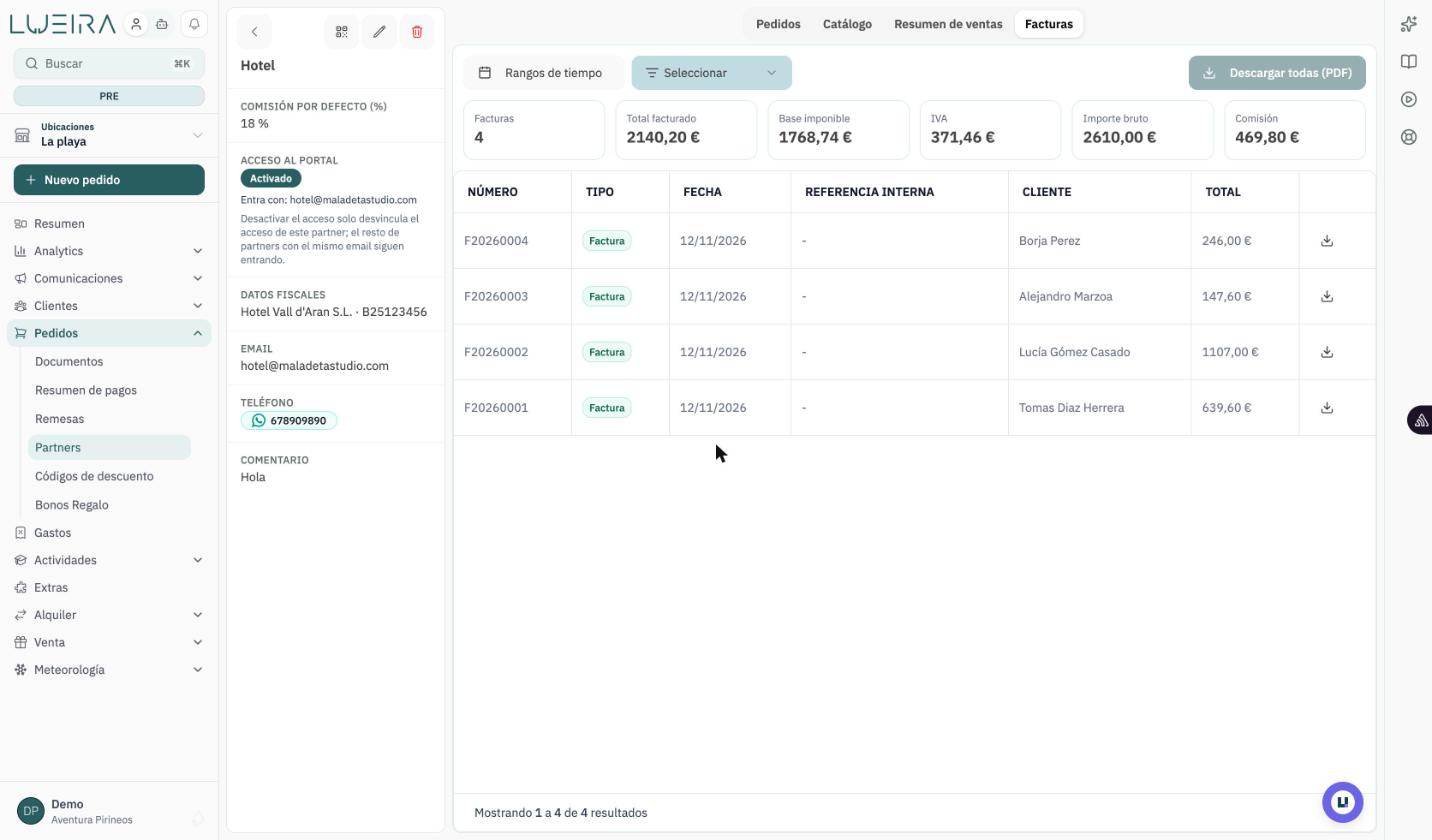
What you see
- Invoices: how many there are in the period and how many are corrective.
- Total invoiced: what was charged to the partner (already net of the commission).
- Taxable base and VAT of the total invoiced.
- Gross amount: the price of the services before deducting the commission.
- Commission: what was deducted from the partner.
Below, the table with each invoice's number, type (invoice or corrective), date, internal reference, customer and total. Every row has its download button.
Filter and download
- Choose a period in the time range selector. The totals update instantly.
- Click Download all (PDF) to get the period's invoices in a zip.
Note: you must choose a period to download the zip. Drafts are not included: only issued invoices count.
Related guides
Related guides
- Orders navigationView the status of all your orders, invoices or payments
- How to create ordersWe show you how to create orders and add every type of product to them.
- Creating a lesson booking from the admin: several days, a second teacher and line priceHow to create a lesson order from the admin: add private or group sessions, book several days in a row, add a second teacher without losing the charge for the second lesson and change the price of a line.
- Order statusesThis section gives you an overview of the status an order is in
- Order lifecycle: statuses, payment and confirmationA complete explanation of the order and payment statuses in Lueira, how they relate to each other, and when an order is confirmed automatically or manually depending on the payment method.
- Deleted and cancelled orders: the difference, how to see them and how to ask for them to be restoredThe difference between cancelling and deleting an order, where to find cancelled orders, how to find out who changed or deleted an order with Change tracking, and what to do so support can restore an order deleted by mistake.