

Marketing consent and unsubscribes (GDPR)
Consent states, the legacy newsletter consent, how unsubscribes arrive from the provider and good practices for sending only to those who have agreed.
On this page
Who can receive your marketing emails
Who can receive your marketing emails
Sending advertising by email without permission can lead to penalties for breaching the GDPR and the information society services law. Lueira helps you: it only sends to customers who have given their email marketing consent and always respects unsubscribes. This guide explains how it works, what to do with the old newsletter checkbox and which good practices to follow. (This is not legal advice: consult your adviser if you have doubts.)
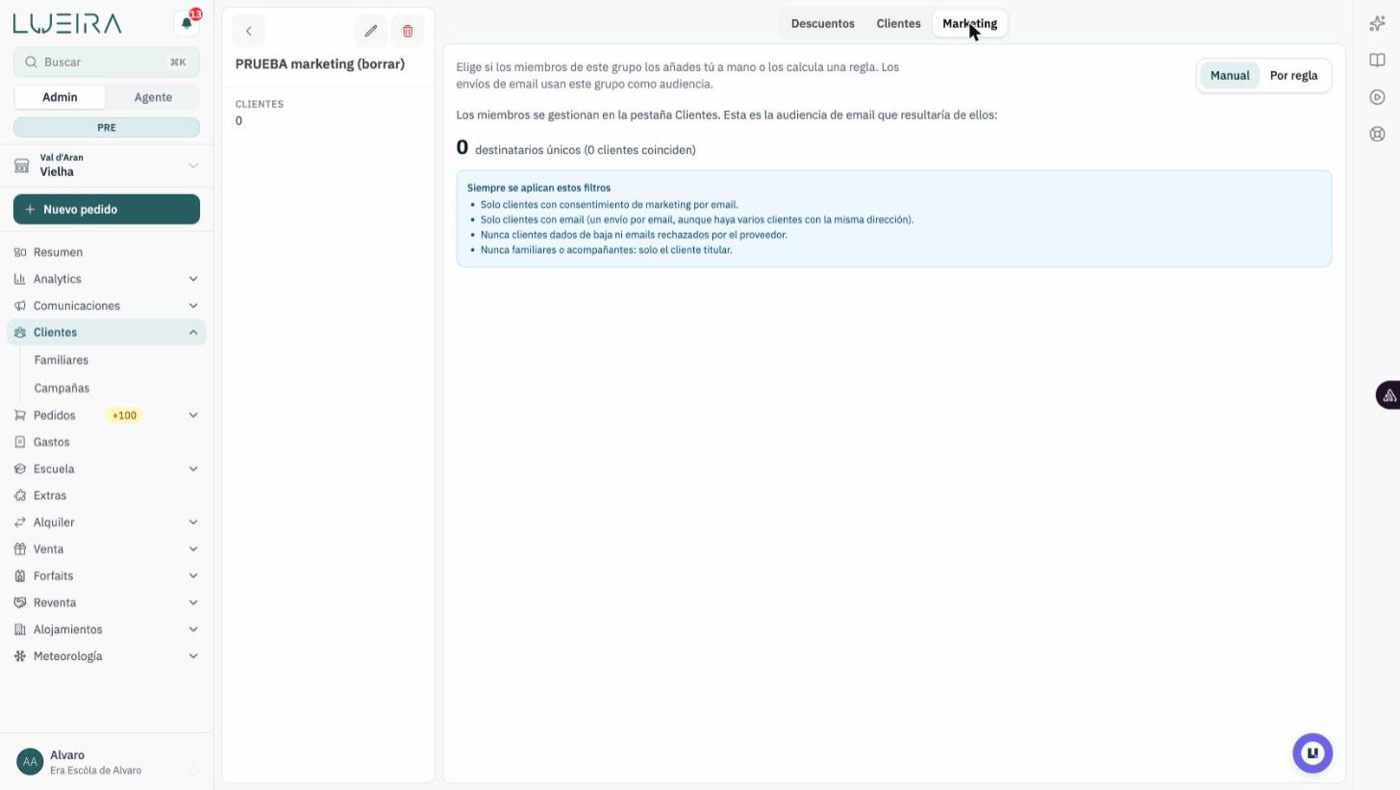
On every send, Lueira always applies these filters, whatever you say in the group:
Only customers with email marketing consent.
Only customers with an email (one send per email, even if several customers have the same address).
Never unsubscribed customers or emails rejected by the provider.
Never family members or companions: only the account-holder customer.
Consent states
Each customer is in one of these marketing consent states:
| State | What it means | Receives campaigns? |
|---|---|---|
| No consent | Has never agreed to receive marketing. | No |
| Pending | Has started the process but is not yet confirmed. | No |
| Subscribed | Has agreed to receive marketing. | Yes |
| Unsubscribed | Has unsubscribed from an email. | No |
| Cleaned | The provider has removed the email (for example, because it bounces). | No |
In the customer's record, the Receive communications checkbox (when editing the customer, under Additional information) marks that they have given their permission, and the Email marketing field shows their situation. Tick the checkbox only if the customer has given their consent. You can check the effect in the Marketing tab of a group: the recipient count only counts those who have consent.
Legacy consent, unsubscribes and good practices
The old newsletter checkbox
If your customers used to tick a newsletter checkbox when buying, Lueira does not automatically include them in any campaign: you first have to confirm that this consent is valid.
You do it in Settings > Integrations > Marketing (CRM), with the Legacy newsletter consent switch. Its text says: "Contacts who accepted the old newsletter checkbox do not enter any send audience until you confirm that this consent is valid". When you turn it on, Lueira saves the confirmation date ("Confirmed on …").
⚠️ Turn it on only if you are sure that checkbox asked for clear permission to send advertising by email, said who was sending and allowed unsubscribing. If you have doubts, do not turn it on and ask for consent again.
Unsubscribes: how they reach Lueira
Every email carries an Unsubscribe me link in the footer that the provider handles. When a customer clicks it, the provider marks them as unsubscribed and tells Lueira, which stops including them in campaigns. You do not have to do anything.
If someone gives consent again
If a customer who unsubscribed agrees to marketing again (for example, in a new form), they will be able to receive campaigns again from that moment.
Good practices
Ask for consent clearly and separately from the purchase.
Do not buy or import email lists.
Send only what you promised (for example, offers from your school, not from third parties).
Do not remove or hide the unsubscribe link, and always honor unsubscribes.
Keep proof of consent (date, origin).
What to do if…
A customer tells me they do not want any more emails. Ask them to click Unsubscribe me in any email; that way it is also recorded with the provider.
A customer says they unsubscribed and is still receiving emails. Check that they unsubscribed with the same email, and contact support with the name of the send and the date.
My audience comes out as 0 even though I have many customers. It is almost always because consents are missing or you have not confirmed the legacy consent.
I do not know whether my old customers gave consent. Do not turn on the legacy switch until you have clarified it.
I want to see my unsubscribes. Unsubscribes are managed in the provider (Brevo) and reflected in Lueira; for the detail, open the report in your Brevo account.
For the rest of the flow: Create customer groups by rules.
Related guides
- Communications in LueiraThe Communications module brings together everything you need to talk to your customers by email and WhatsApp: templates, the WhatsApp Agent, the unified inbox and the knowledge base that feeds the WhatsApp Agent.
- Before connecting WhatsApp: prerequisites in MetaStep-by-step guide to preparing your Meta business portfolio, business verification, display name and number, and to choosing between the WhatsApp Business app (coexistence) and a dedicated number (Cloud API).
- Connect WhatsApp in LueiraHow to connect your WhatsApp Business number to Lueira: choose between connecting the WhatsApp Business app or a dedicated number, and complete the process in Meta in under 2 minutes.
- One WhatsApp number per locationIf your account has several locations, each one can have its own WhatsApp number. Requirements, how to connect them and what is shared between numbers.
- WhatsApp AgentSet up the WhatsApp Agent, which automatically replies to your customers' WhatsApp messages, uses your articles as its source of information and can create orders directly from the chat.
- What the WhatsApp Agent sells and what it does when it can'tThe WhatsApp Agent only books what exists as a product in your store. For everything else it sends the customer the purchase link from your website. Here you can see how it works and how to set it up.