

Lueira Embed plugin: technical reference
Technical reference for the "Lueira Embed" WordPress plugin: full shortcode parameters, rental module, URL structure, CSS customisation, sandbox attributes, requirements and changelog.
On this page
- Features of the Lueira Embed plugin
- Manual plugin installation (without using the modal)
- Advanced plugin configuration
- Shortcode generated by product type
- Shortcode parameters
- Shortcode examples with additional parameters
- URL structure
- Customisation with CSS
- Available CSS classes
- Compatibility
- Security: iframe sandbox attributes
- Plugin requirements
- Version history
This guide is the technical reference for the "Lueira Embed" plugin for WordPress. It is intended for people with knowledge of WordPress or HTML who want to go beyond the "Embed code" modal: customise the button, apply CSS classes, check all the shortcode parameters or understand the URL structure.
👉 If you only need to embed a product quickly, it is better to start with the visual guide: How to embed your Lueira activities in your WordPress website.
Features of the Lueira Embed plugin
Easy integration: embed Lueira products using a shortcode, with no technical knowledge needed.
Responsive design: the modal automatically adapts to any device.
Accessible and secure: it complies with ARIA standards and uses a protected (sandboxed) iframe.
Customisable: lets you change the button text and apply your own styles.
Simple configuration: includes language options and settings from the WordPress panel.
Manual plugin installation (without using the modal)
Upload the files to the
/wp-content/plugins/lueira/folderActivate the plugin from the Plugins menu in your WordPress panel.
(Optional) Go to Settings > Lueira Embed to configure the URL of your centre in Lueira.
Advanced plugin configuration
Go to Settings > Lueira Embed in the WordPress panel to configure:
Host URL: the base address of the Lueira marketplace (default: https://store.lueira.com).
Shortcode generated by product type
The "Embed code" modal in the admin generates a shortcode adapted to the product type. These are the exact forms it produces:
Product type | Generated shortcode | Iframe embed URL |
Group lesson |
|
|
Private lesson |
|
|
Group lesson package |
|
|
Rental product |
|
|
Rental pack (bundle) |
|
|
⚠️ Special case — individual rental products: the generated shortcode does not include the product_type parameter. The plugin assumes product by default when module="rent" is used without an explicit type. Only rental packs (bundles) carry product_type="bundle".
Shortcode parameters
The modal only exposes the required parameters. If you want to customise further (button text, language, CSS classes), edit the shortcode after copying it, adding the optional parameters:
Parameter | Required | Default | Description |
| Yes | - | The ID of the product to be embedded |
| Yes | - | "school" (lessons / lesson packages) or "rent" (rental / rental packs) |
| Depends | "product" if module="rent" | "private", "group", "group-package" for school; "bundle" for rental packs. It can be omitted for individual rental products. |
| No | "es" | Language code to display the localised content. The modal does not add this parameter; you have to add it by hand if you need it. |
| No | "View activity" | Text that will be shown on the shortcode button |
| No | - | Additional CSS classes for the button |
Shortcode examples with additional parameters
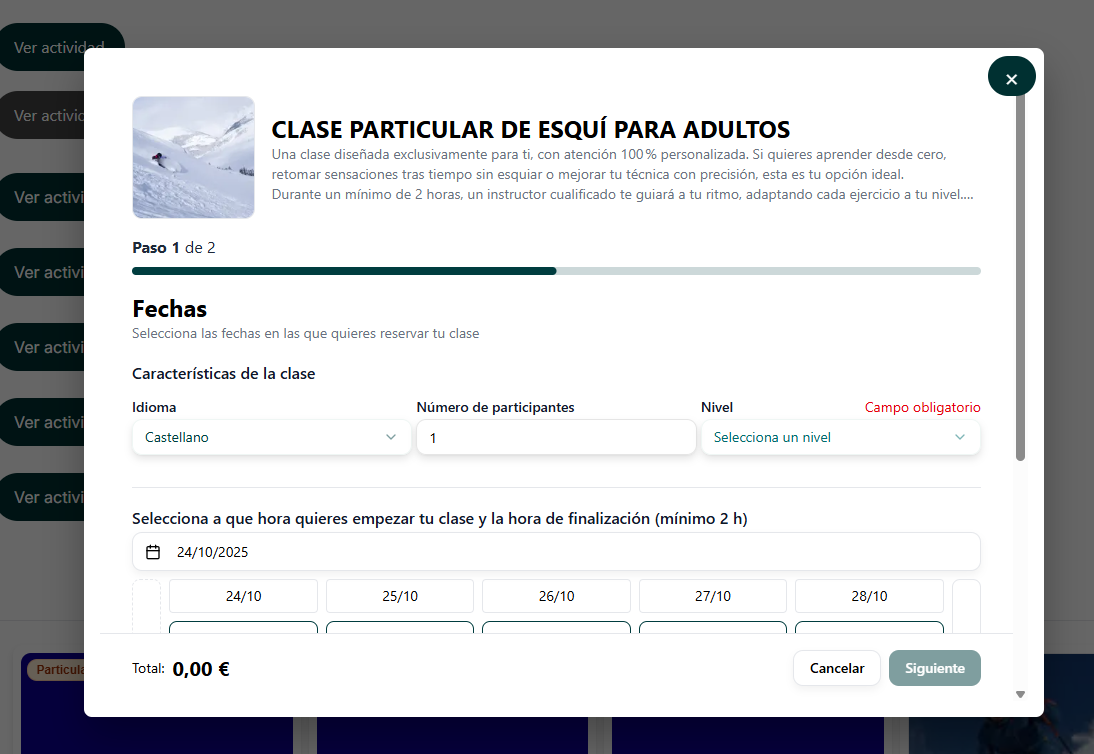
Private lesson with custom button text:
[lueira id="456" module="school" product_type="private" button_text="View Activity"]

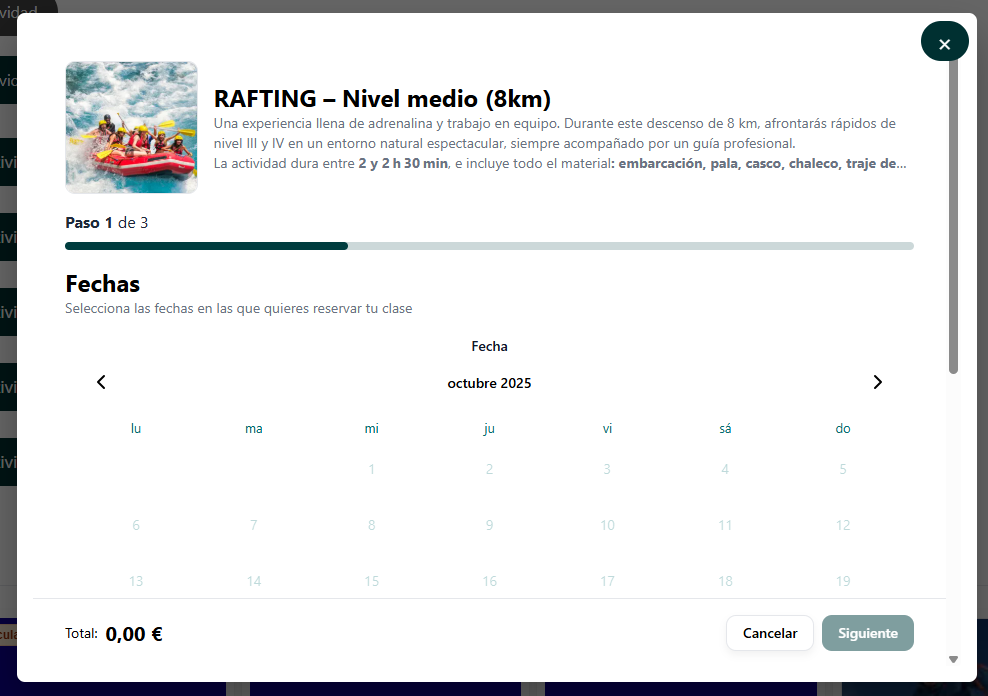
Group lesson package with its own CSS class and language forced to Spanish:
[lueira id="789" module="school" product_type="group-package" lang="es" class="btn-primary" button_text="View Activity"]
URL structure
URLs generated by the "Embed code" modal (iFrame tab):
The admin modal generates URLs without a language prefix. The format is:
{host_url}/embed/{module}/{product_type}/{activity_id}
Exception: for individual rental products the type segment is literally product, like this: {host_url}/embed/rent/product/{id}.
URLs generated by the WordPress plugin from the shortcode:
The plugin builds URLs with the following format, adding the language segment if you define it:
{host_url}/{lang}/embed/{module}/{product_type}/{activity_id}
Examples:
Customisation with CSS
The plugin includes default CSS styles for the modal and the button. You can customise their appearance in the following ways:
Adding custom CSS classes through the
classparameter of the shortcode.Overriding the plugin's styles from your WordPress theme.
Directly modifying the
modal.cssfile included in the plugin.
Available CSS classes
Class | Element |
| Button container |
| Button that opens the modal |
| Main modal container |
| Modal background or overlay |
| Modal dialog box |
| Button to close the modal |
Compatibility
Modern browsers: Chrome, Firefox, Safari and Edge.
Mobile-friendly (responsive) design.
Accessibility compliance with ARIA attributes.
Security: iframe sandbox attributes
The iframe embedded by the plugin includes the following sandbox security attributes:
allow-same-originallow-scriptsallow-popupsallow-formsallow-top-navigation-by-user-activation
Plugin requirements
WordPress 5.0 or higher
PHP 7.4 or higher
Version history
Version 1.0.0
Shortcode implementation with overlay modal
Settings page in the admin
Responsive design
Multi-language support
Iframe with security sandbox
If you have any questions about how to configure iframes on your website, don't hesitate to contact us!
Related guides
- Configuring Company Settings in LueiraIn this section you can configure all the properties of your school
- Settings (School / Center / Activities)Configure the parameters of your school, center or activities space: levels, meeting points, schedules, prices and more.
- Features: turn optional features on or off in your accountHow to turn Short courses, Private lesson vouchers, Material resources and Instructor ranking on or off from Settings > Company > Features.
- Several sites or centers in one Lueira accountHow to manage several sites (establishments) in the same account: create a site, give it its own online store link and decide whether it invoices with its own tax details.
- Diagnose: check your setup, an order or a productHow to use the Diagnose button and the Setup status screen to find out what is missing or wrong in your account, your store, an order, a pack or a product, and how to fix it.
- Create and manage locationsHow to create, edit and delete a location (a physical place where you operate) in Settings > Locations, what each field means and what to do if you cannot create one.