

Participants from any customer: adding relatives of another customer to an order
What the "Any customer relative" setting does and how to turn it on to pick relatives of any customer in your database when creating an order.
On this page
Participants from any customer
By default, when you add a participant to an order in Lueira, you can only pick a relative that belongs to the order's own customer. The «Any customer relative» setting lets you pick, instead, a relative of any customer in your database (always within your own account; never from another Lueira account).
This is useful when several people share a booking but each is registered as an independent customer, or as a relative of different customers — for example, groups of friends booking separately, families that already had separate customer records, or schools booking for students from different families.
How to turn it on
Go to your profile (bottom-left corner of the panel) > Settings > Company > Features and turn on the «Any customer relative» switch.
It is off by default, and each business decides whether to turn it on; the change is saved instantly, with no need to reload the page.
📘 See Features: turn optional features on or off in your account for the rest of the switches on that screen.
What changes when adding participants to an order
- Off (default): when adding a participant to an order, the relatives search only shows those belonging to the order's customer.
- On: the relatives search shows those of any customer in your account, not just the order's customer.
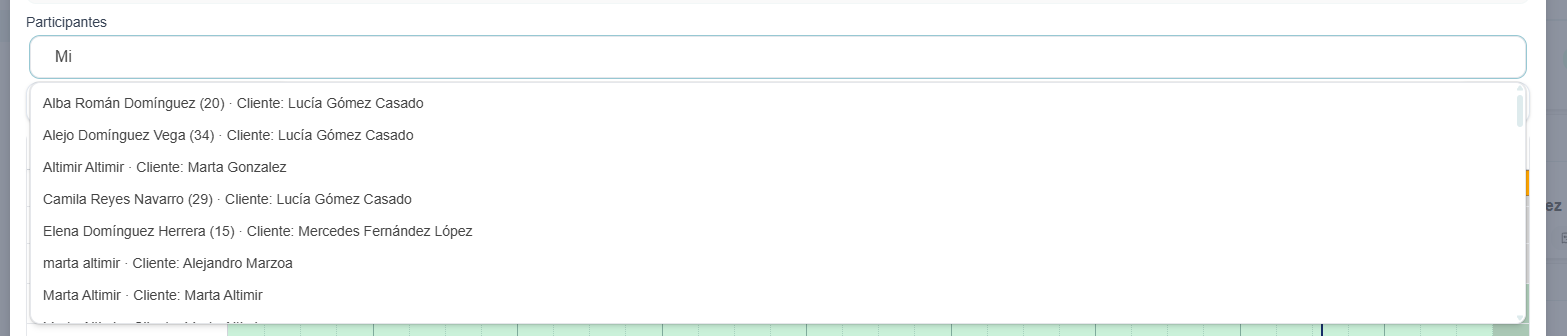
It applies when adding participants to group lessons (including courses and packs), private lessons (including hour packages) and rental orders.
What doesn't change
- The relative chosen still has to belong to a customer of your own account: you can never pick a relative from another Lueira account or business.
- The order stays linked to the customer who created it; picking another customer's relative as a participant doesn't change the order's holder or its billing details.
Related guides
- Add a new customerLearn how to manage your customer database.
- Creating customer groups with rulesHow to set up a customer group that is either manual or calculated automatically from rules (bookings, rental, activities, purchases, spending, language), which filters always apply and how consent affects the audience.
- Customer PortalThis section explains how the new Customer Portal works within the Online Store.
- How to book and view your bookings, packs and vouchers in the customer portalA guide for your customers: how to log in to the customer portal, view your bookings, check your pack or voucher and book new sessions. Designed to be linked from the confirmation email.
- Installing the ID card scanner
- Installing the Plustek scanner (driver and connection program)How to install the Plustek SecureScan X-Mini scanner on the desk computer: first the driver, then the connection program (WebSocket), and how to test it in Lueira.