

Reports in Lueira
Complete guide to all the CSV files and exports available in Lueira: payments, orders, private lessons, group lessons, rentals and instructor hours.
Which exports are available?
Lueira lets you export data in CSV format (compatible with Excel) from several sections of the platform. Here is a summary of all the available exports:
Payments Excel → all payments received, with payment date, method and associated products
Orders Excel → summary of all orders, broken down by category (school, rental, shop…)
Teachers Hours Summary → hours worked, bonuses and financial totals per teacher
1. Payments Excel
Where is it? Payments section → export / CSV download button.
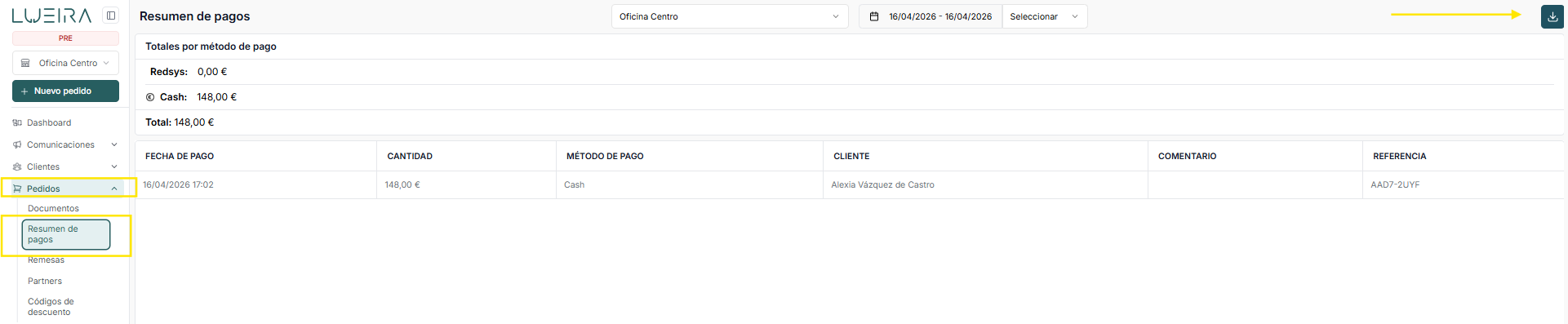
What is it for? To see all the payments completed in a given period, together with the customer's details, the payment method and the products linked to the order.
CSV columns:
Column | Description |
REFERENCIA INTERNA | Reference of the order the payment belongs to |
€ TOTAL PAGO | Amount of this particular payment (it may be a partial payment) |
FECHA CREACIÓN PAGO | When the payment was recorded in the system |
FECHA DE PAGO | When the payment was completed/confirmed |
MÉTODO DE PAGO | Cash, card terminal (POS), bank transfer, Stripe, etc. |
TIPO DE DOCUMENTO | Type of the tax document associated with the order (invoice, receipt…) |
NÚMERO DOCUMENTO | Invoice or receipt number |
FECHA DEL DOCUMENTO | Date of the tax document |
€ TOTAL PEDIDO | Total amount of the whole order (not just this payment) |
NOMBRE CLIENTE | Customer's first name |
APELLIDOS CLIENTE | Customer's last name |
PRODUCTOS | Names of the products included in the order |
⚠️ Important: payments are linked to orders, not to individual products. An order can include several products (e.g., a private lesson + a rental), and the payment is recorded at the level of the whole order. The PRODUCTOS column shows the products in the order, but it is not possible to tell which part of the payment corresponds to each specific product.
2. Orders Excel
Where is it? Orders section → export / CSV download button.
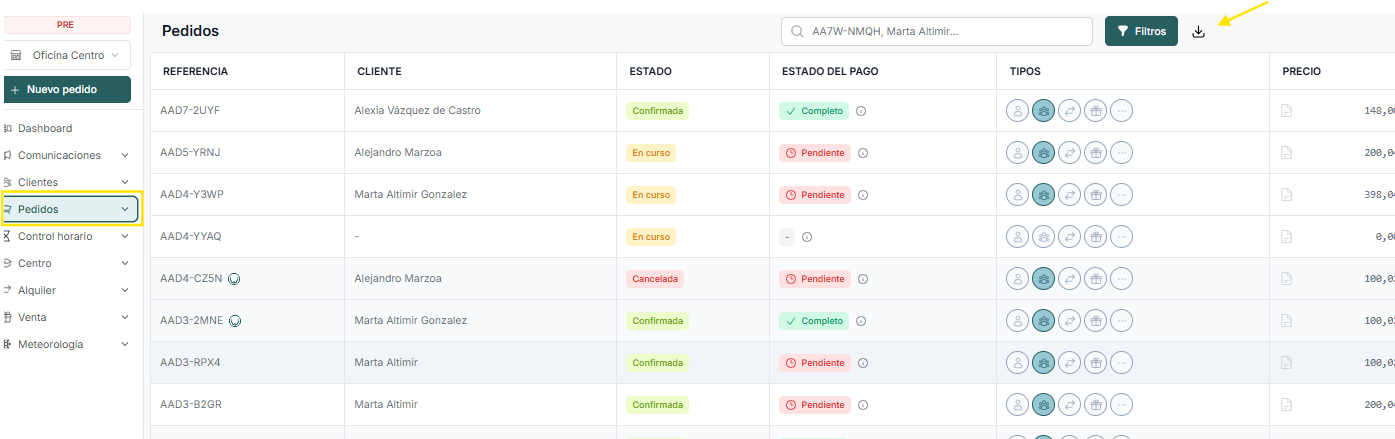
What is it for? To get a summary of all orders with the amount broken down by type of activity. It is ideal for finding out how much the school (private and group lessons), rental and shop each invoiced separately in a season or date range.
CSV columns:
Column | Description |
Referencia | Internal reference of the order |
Cliente | Customer's full name |
Customer's email | |
Estado de la reserva | Order status (confirmed, cancelled…) |
Estado del pago | Whether it is paid, pending payment, etc. |
Importe pagado | Total already collected for the order |
Importe pendiente | What is left to collect |
Tipo | Types of products included in the order |
Precio | Total price of the order |
Ubicación | Location associated with the order |
Fecha de creación | When the order was created |
Escuela privados | Amount for private lessons within the order |
Escuela grupos | Amount for group lessons within the order |
Alquiler | Amount for rentals within the order |
Tienda | Amount for shop items within the order |
Personalizado | Amount for custom products |
Productos | Names of all the products in the order |
3. Teachers Hours Summary
Where is it? Statistics → Time log section → export / CSV download button.
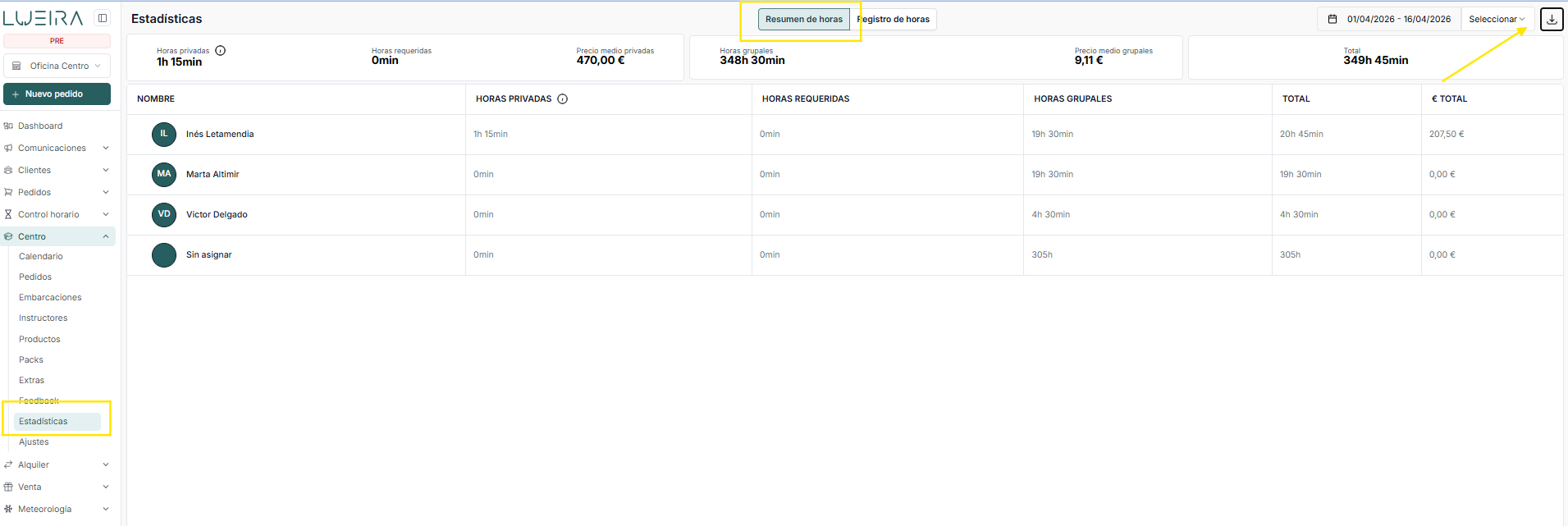
What is it for? To get the financial and hours-worked summary for each teacher in a given period: private and group lesson hours, required hours, base salary, bonuses and total to pay.
CSV columns:
Column | Description |
PROFESOR | Name of the teacher |
SALARIO | Configured base salary |
HORAS PRIVADAS | Total hours of private lessons taught |
HORAS REQUERIDAS | Minimum hours required by contract |
TOTAL € HORAS REQUERIDAS | Amount corresponding to the required hours |
HORAS GRUPALES | Total hours of group lessons taught |
TOTAL HORAS | Total sum of hours worked |
TOTAL € SIN PRIMAS | Financial total excluding bonuses |
[bonus columns] | One column for each type of bonus configured in the tenant |
TOTAL € PRIMAS | Total sum of all bonuses |
TOTAL € | Final total to pay to the teacher |
HORAS PRIVADAS {producto} | Private lesson hours broken down by product (one column per product) |
HORAS GRUPALES {producto} | Group lesson hours broken down by product (one column per product) |
Related guides
- Configuring Company Settings in LueiraIn this section you can configure all the properties of your school
- Settings (School / Center / Activities)Configure the parameters of your school, center or activities space: levels, meeting points, schedules, prices and more.
- Features: turn optional features on or off in your accountHow to turn Short courses, Private lesson vouchers, Material resources and Instructor ranking on or off from Settings > Company > Features.
- Several sites or centers in one Lueira accountHow to manage several sites (establishments) in the same account: create a site, give it its own online store link and decide whether it invoices with its own tax details.
- Diagnose: check your setup, an order or a productHow to use the Diagnose button and the Setup status screen to find out what is missing or wrong in your account, your store, an order, a pack or a product, and how to fix it.
- Create and manage locationsHow to create, edit and delete a location (a physical place where you operate) in Settings > Locations, what each field means and what to do if you cannot create one.