

Rental Product Pricing
How to set the price of a rental product in Lueira: simple linear pricing or an advanced pricing scheme (volume discounts).
When adding a new Rental product we have to define its price. Lueira supports two types: simple price (linear) or advanced price (scheme with volume discounts).
If what you want to set up is a bundle of rental products, see Rental Bundle Pricing.
1. Simple price
A simple price means the product always has a linear price. We have to set a price per day, per hour and per session, but the same price will always apply. A session lasts as long as the school decides. For example, we define a session as the whole season and set a rental price of €200 per season.

2. Advanced price
This type of price is not linear: usually the price decreases the more days the customer rents the product. It is important to note that prices apply to the product, not to the variations.
To create a pricing scheme, go to Rental → Settings → Pricing. Once here, we will create as many pricing schemes as we want.
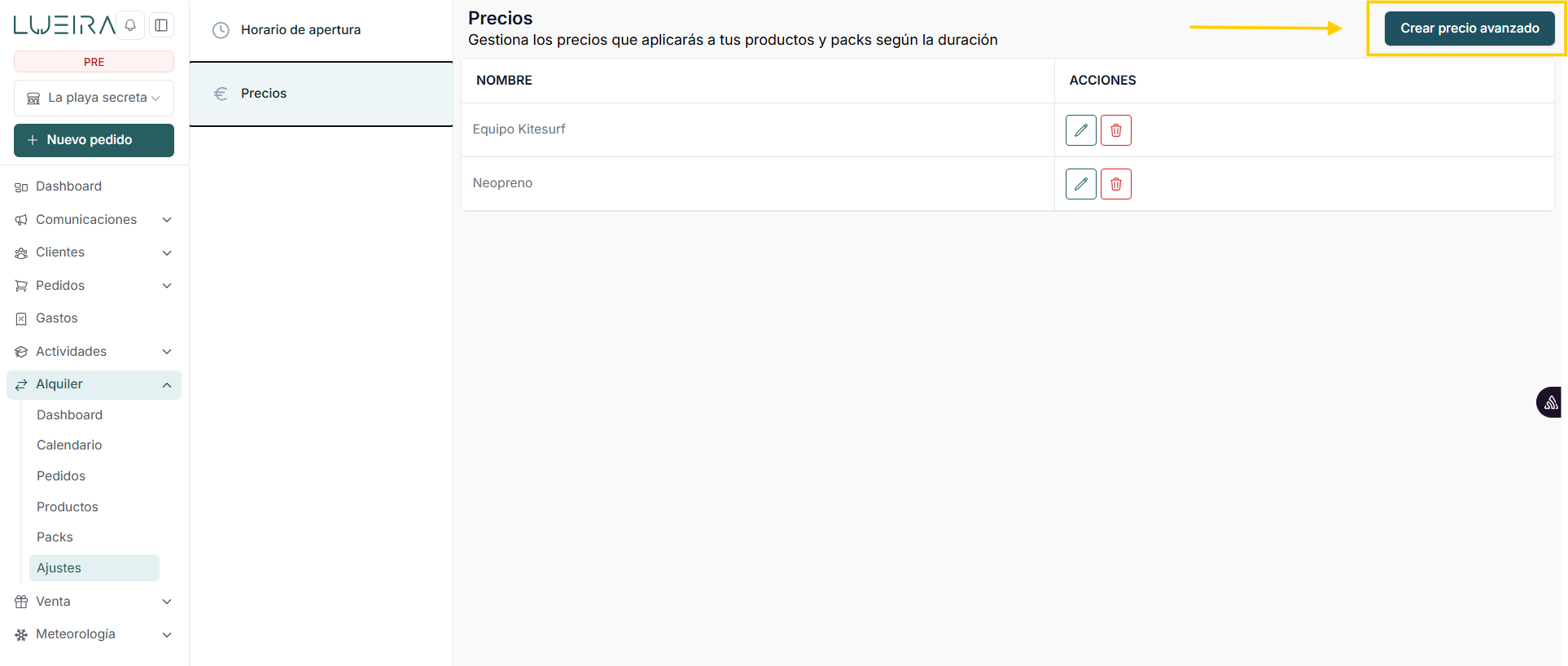
For example, let's create 2 schemes: Wetsuit and Kitesurf Equipment.
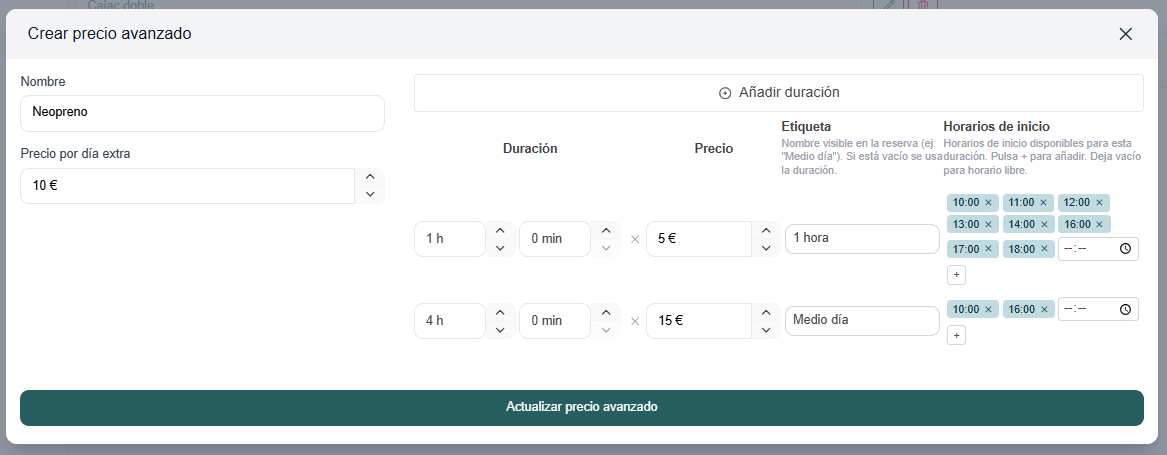
Wetsuit: we set prices for 1 h and 4 h time slots. We set an extra day price of €10.
1 h → €5 — label "1 h" — start times: 10:00, 11:00, 12:00, 13:00, 14:00, 15:00, 16:00, 17:00, 18:00
4 h → €15 — label "Half day" — start times: 10:00, 14:00
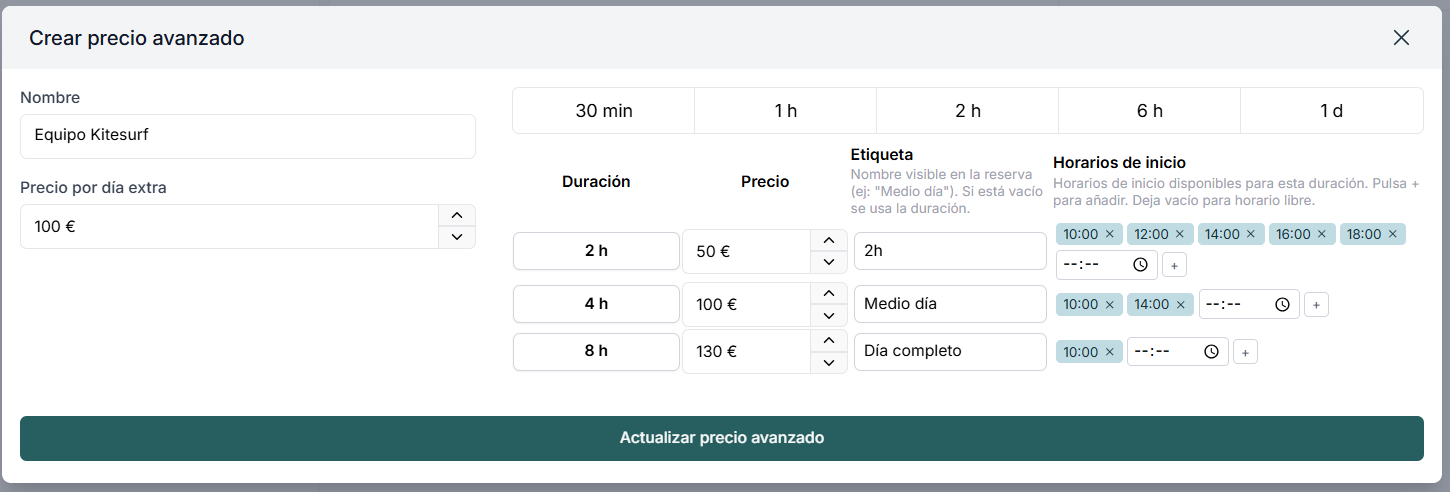
Kitesurf Equipment: we set prices for 2 h, 4 h and 8 h time slots. We set an extra day price of €100.
2 h → €50 — label "2h" — start times: 10:00, 12:00, 14:00, 16:00, 18:00
4 h → €100 — label "Half day" — start times: 10:00, 14:00
8 h → €130 — label "Full day" — start time: 10:00
2.1 Label and start times
Each time slot in a pricing scheme has two additional fields:
Label — name visible to the customer during booking (e.g., "Half day", "Full day"). If left empty, the duration is shown automatically.
Start times — list of times at which the rental can start for that slot (HH:MM format). If left empty, the customer can freely choose the start time (previous behavior). If start times are defined, the customer can only choose among the available ones.
When a slot has start times defined, booking —both in the admin panel and in the online store— follows a step-by-step wizard: date → available slot → start time → units. The end time is calculated automatically by adding the duration to the selected start time.
Behavior in the store vs. the admin panel:
Online store — only the start times that have stock available and fall within the opening hours configured for that day are shown. Those outside the opening hours do not appear.
Admin panel — all start times configured in the pricing scheme are shown, regardless of the opening hours. This allows the tenant to create orders with flexibility even if the schedule is closed.
Once the advanced pricing schemes are defined, we can apply them to products.
Related articles
Pricing in Lueira — index guide with all pricing models.
Rental Bundle Pricing — how to set the price of a product bundle.
If you have any questions, don't hesitate to contact the Lueira support team!
Related guides
- Add and manage rental productsHow to create rental products, set up their variations and items, manage how they behave in the online store, and how customers can book several units at once.
- Add Packs to rentalIn this section we will show you how to create product packs
- Configure a rental packHow to create a pack, assign it a pricing schema and configure its visibility in the online store and the catalog.
- Add and configure product groups in a packHow to add the product groups that make up a pack (skis, boots…), their form and the visibility of their variations in the online store.
- How do I delete a barcode from a rental item?How to remove the barcode from a rental item, and how that differs from deleting the item or the product variation.
- Forms in rental packs: what is asked and how to avoid repeated questionsA rental pack can ask for a participant form, a check-in form and a form for each element. Here you can see which is which and why identical questions are not repeated.