

Forms in rental packs: what is asked and how to avoid repeated questions
A rental pack can ask for a participant form, a check-in form and a form for each element. Here you can see which is which and why identical questions are not repeated.
On this page
Which forms a pack can ask for
In a rental pack (for example "Ski kit" with boots and skis) you can set up forms in two places. To use forms you have already created, first see Product Forms.
1. Pack forms
Open the pack in Rental > Packs, press the pencil (Edit pack), go to the Settings tab and to the Forms and documents section:
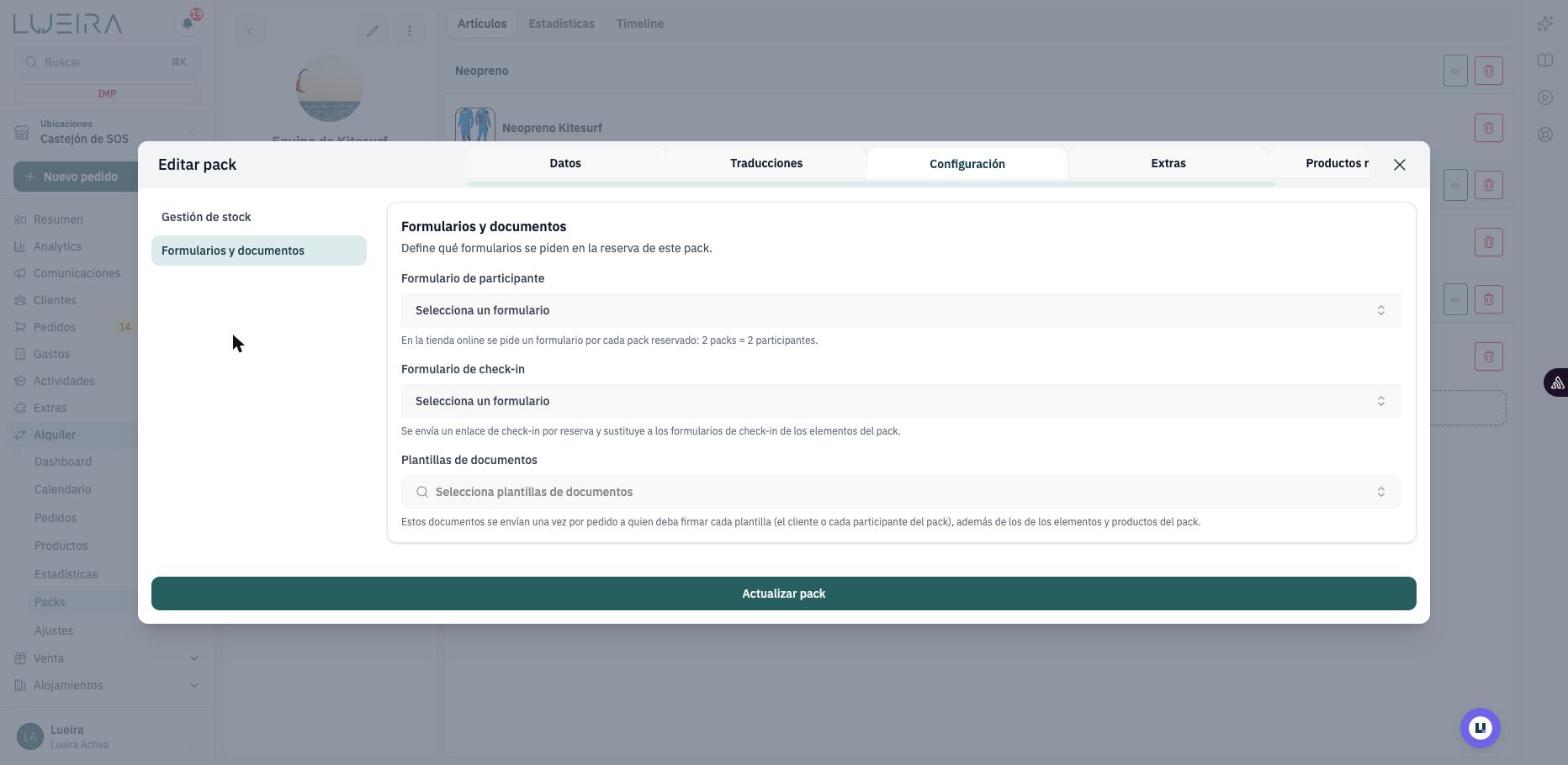
Participant form: in the online store, one is requested for each pack booked: 2 packs = 2 participants.
Check-in form: one check-in link per booking is sent and it replaces the check-in forms of the pack's elements.
Document templates: they are sent once per order to whoever has to sign each template (the customer or each participant of the pack), in addition to those of the pack's elements and products.
2. Form for each element
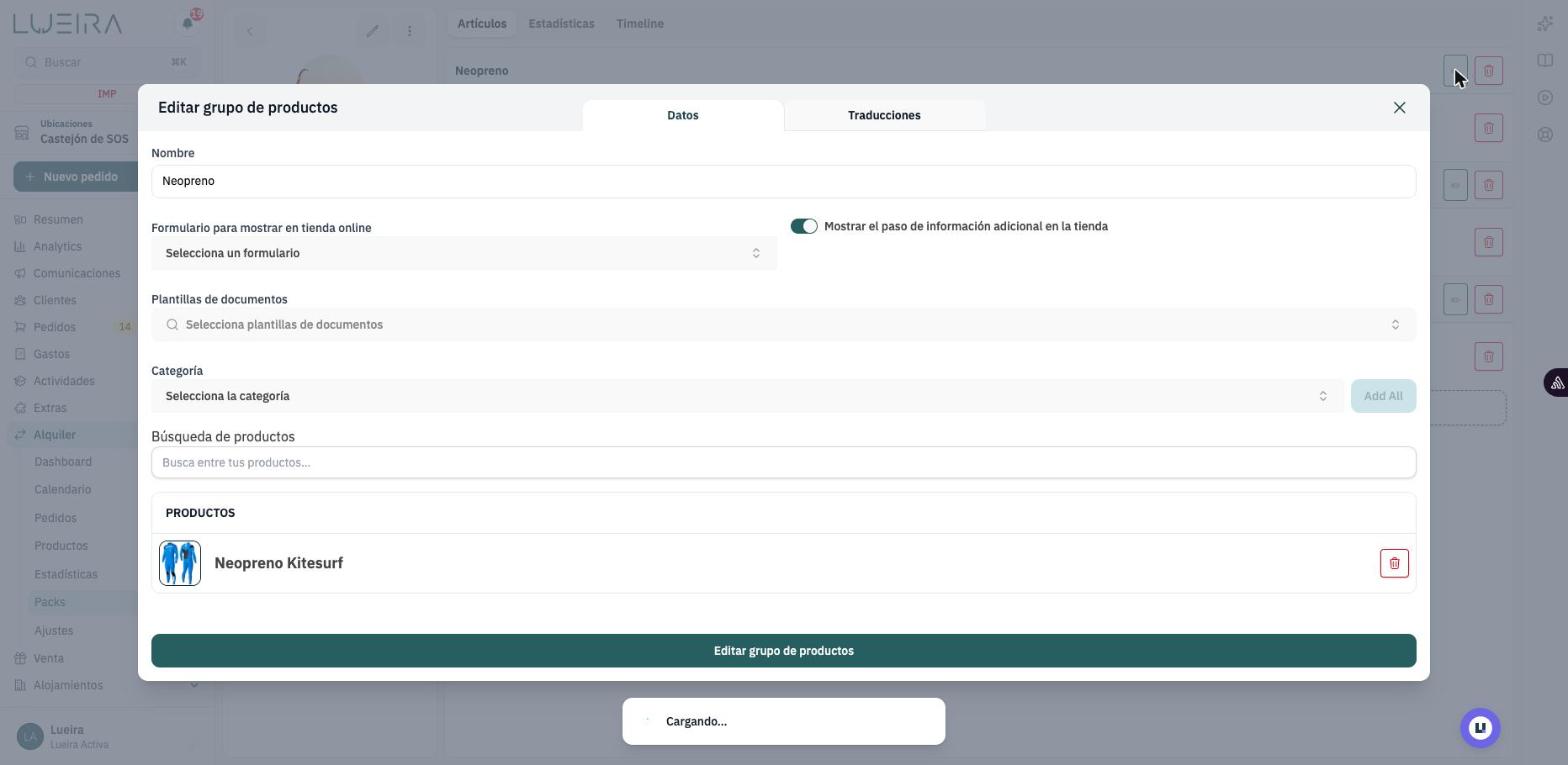
In the pack's Items tab, each product group (for example "Boots" or "Skis") has its own pencil. When you open it you will see Form to show in online store and the switch Show the additional information step in the store. That form is requested for each unit of that element included in the pack.
It asks me the same thing twice (for example "Username")
It is common for the boots and skis forms to ask for the same thing ("Username", helmet size…). You don't need to remove the question from either of them: that way, if someone books only boots or only skis separately, they still see it.
When booking the pack, Lueira asks only once the questions that are repeated across the elements' forms and saves the answer in each form, so every element ends up complete. Two questions are considered the same when they match in:
The question type (text, number, email, phone, date, checkbox, single choice or dropdown).
The question text, regardless of capitalization, accents or punctuation ("Username" and "username:" are the same).
If it is a choice question, the same options.
If the question is required in one form, it will also be required in the pack. Informational texts, file uploads, signatures and consents are not merged: they are requested for each element.
If you see the question repeated: open the elements' forms and check that the text, type and options are identical (for example "User Name" and "Name of the user" do not match). If they already are and it still appears twice, write to us with the name of the pack.
Old and new pack form
If you used to set up check-in inside each element of the pack, that form is now set up in the pack and replaces the one in the elements: for check-in you don't need to delete anything, but you do need to choose the form in the pack's Check-in form field.
The answers for each booking can be seen in the order, separated by unit and by pack element. To view them and resend a form, see Managing Check-in form submissions.
Related guides
- Add and manage rental productsHow to create rental products, set up their variations and items, manage how they behave in the online store, and how customers can book several units at once.
- Add Packs to rentalIn this section we will show you how to create product packs
- Configure a rental packHow to create a pack, assign it a pricing schema and configure its visibility in the online store and the catalog.
- Add and configure product groups in a packHow to add the product groups that make up a pack (skis, boots…), their form and the visibility of their variations in the online store.
- How do I delete a barcode from a rental item?How to remove the barcode from a rental item, and how that differs from deleting the item or the product variation.
- Rental SettingsThis section explains which settings affect rentals.